Everything you need to know about "require" in NodeJS and maintaining it’s cache.
Wed Jan 01 2020 • ☕️ 6 min read
I got into studying the Node JS module system to solve the problem of reducing the 5XX count on the company’s mobile website(Click to learn more about what I do), this count used to shoot up on every release which required restarting of our NodeJS servers. We all have faced this issue of restarting the node JS server for reflecting our changes in the server code and a popular workaround is to use npm packages such as daemon - npm or forever - npm and that's all great but only during development as in a production environment this would eat up a lot of memory and would generate a lot of 5XXs if you have a large user base.
So, the problem was simple, to push code changes on a node server running in a production environment without restarting it...sounds like a solution for this should already exist, well it kind of does but you need to dig deep into the NodeJS docs.I'll be sharing my solution to this and some statistics of what change it brought to the overall 5XX count after going through a series of concepts about the module management system in NodeJS. Let’s start with CommonJS…
CommonJS what, why and the how?
What is it? CommonJS is a module formatting system. It is a standard for structuring and organizing the JavaScript code and the reason why I was concerned with it was because CJS has heavy influence on NodeJS’s module management.

What's that...a module? Well a module is just a bit of code encapsulated in a file and exported to another file. Modules focus on a single part of the functionality and remain loosely coupled with other files in an application. This is because there are no global or shared variables between modules, as they only communicate via the module.exports object. Any code that you want to be accessible in another file can be a module..so just say bye to using global variables and giving them complex names for protecting their values from being overridden!
How? CommonJS wraps each module in a function called 'require', and includes an object called 'module.exports', which exports code for availability to be required by other modules. All you have to do is add whatever you want access to other files onto the 'exports' object and require the module in the dependent file. the syntax for the require function is "var someVariable = require('moduleID/pathOfModule');". Here’s an example…
//In multiply.jsfunction multiply (a, b) {
  return a * b
}
module.exports = multiply
//In someOther.js
var a  =  require('multiply.js').multiply(2,3);
All about “require”
The module loading mechanism in Node.js is caching the modules on the first require call. It means that every time you use require(‘multiply.js’) you will get the same instance of multiply-module, which ensures that the modules are singleton-like and have the same state across your application.
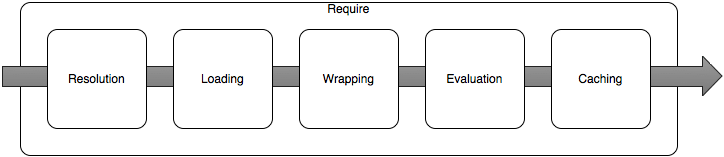
All these steps are performed whenever we require a module in NodeJS and is pretty self explanatory…but what we need to manipulate a little is the caching part...and yes, one more thing about require is that if the identifier passed to the require function is not a native module or a file reference (beginning with /, ../, ./ or similar), then Node.js will look for installed modules traversing the file system looking for the referenced module in the node_modules folder.
The solution - Inspecting require.cache
When we console.log(require.cache) in a js file requiring a file from another module and run it in node js,it looks something like this..
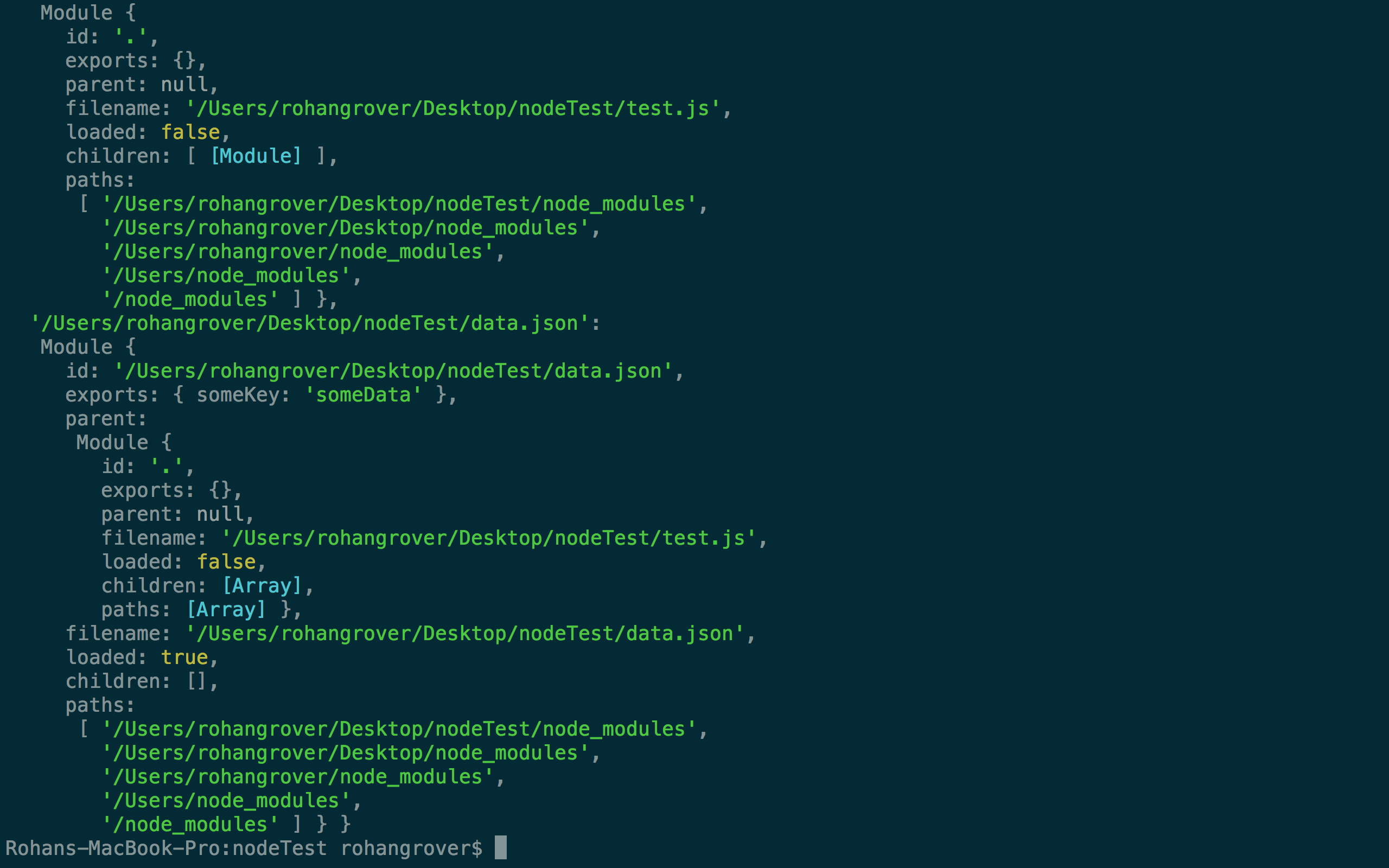
Clearly , require.cache is an object containing multiple nested objects , the key to these nested objects is the filepath which was required in the js-file.In this example test.js requires a file data.json
So the file '/Users/rohangrover/Desktop/nodeTest/data.json' has been cached..having data { "someKey": "someData" }

Well now it is pretty straight forward to figure out what to do next..just delete the file path you want node js to reload with the updated code...the path needs to be absolute
delete require.cache['/Users/rohangrover/Desktop/nodeTest/data.json']
Here is a code snippet that allows you to traverse through the entire project structure, written as event emitter(What's an event emitter?)
const EventEmitter = require('events');
class cacheHandler extends EventEmitter
{
    parseCachedFiles()
    {
        let procSucess=true,cn=1,data={"files":{}};
        for(let prop in require.cache)
        {
            let cacheStatus=this.clearCache(prop);
            if(cacheStatus==="success")
            {
                data["files"][cn] = prop;
                cn++;
            }
            else
            {
                data["error"] = cacheStatus;
                procSucess=false;
                break;
            }
      }
        if(procSucess)//cache cleaned successfully.
        {
          console.info(data);
        }
        else//cache cleaning failed
        {
          console.error(data);
        }
    }
    clearCache(filePath)
    {
        try{
            delete require.cache[filePath];
            return "success";
        }
        catch(error)
        {
            return error
        }
    }
}

module.exports = cacheHandler;
Create an instance
var cacheHandler = require('./cacheHandler');
var cData = new cacheHandler();
cData.on('clearCache', cData.parseCachedFiles);
Emit it when there is an update in your server code
cData.emit('clearCache');